Chapter 1 - Description of PrintfilThis software allows character based applications to print to any Windows printer, including USB, network printers, faxmodems and PDF writers, even if it is a Dos/Windows application or a Unix/Linux app. running on a Windows PC via telnet, without changes to the original applications. You can set your application to print to an ascii file, or you can have Printfil capturing a parallel port (PRN: and from LPT1: to LPT9:) or serial port (from COM1: to COM9:), automatically redirecting your print jobs to any printer, even to a printer which is physically connected to the captured port and even if no parallel ports and serial ports are physically installed on your machine (you only have USB ports for printers). Printfil loads at PC bootup and runs as a background task on the tray area (in the bottom right corner, near the Windows clock). It activates automatically when it finds something to print. In addition, it allows you to:
All this without changes to your applications. If you are developing host based applications (like Unix) to run on a Windows Terminal Emulator, you can stop battling with transparent-print characters and different settings for different printers. All you need is a shared file system (NFS, SCO-VisionFS, Samba etc. ) to store output for your print jobs and PRINTFIL. You can find some examples of working configurations here: https://www.printfil.com/eexam.htm 
|
||||
17 Aug 2023
|
||||
Printfil Manual - Description of the software
Windows Printing System For Applications


 How to print from DOS PRN, LPT1: to Windows printers: USB, Wi-Fi, PDF
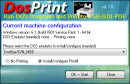 Run DOS programs on Windows 64-bit through DOSBox / vDos and print to USB, GDI, PDF printers through Printfil
Facebook ★★★★☆ (4.9/5) on 41 reviews